Message ordering is a crucial part of any chat application. It ensures that conversations feel natural and are easy to follow. When messages appear in the wrong order, users can quickly become confused and frustrated. What seems like a simple requirement (showing messages in chronological order) actually involves several challenging edge cases, especially on mobile devices.
The Challenges of Message Ordering
Some factors that disrupt the natural flow of messages.
How to Implement Message Ordering ?
To implement reliable message ordering, a key design decision is choosing which field to use for sorting messages. The data model typically provides two main options which are a server-generated messageId and a client-generated createdAt timestamp.
Order by messageId
In this approach, the backend assigns a unique, sequential ID to each message as it is processed. This ensures a consistent and authoritative order across all devices.
Advantages
Disadvantages
messageId until the backend generates it, which can introduce latency.Order by createdAt Timestamp
Here, the client sets a timestamp when the message is created. This allows for immediate display of the message in the UI, even before it has been sent to the server.
Advantages
Disadvantages
Synchronizing Clocks
A third option is to use a createdAt timestamp but with backend clock synchronization. This combines the benefits of timestamps with improved reliability (read Simple Precision Time Protocol (SPTP)).
Advantages
Disadvantages
Trade-offs at a Glance
| Order by | Advantages | Disadvantages |
|---|---|---|
| messageId | A server-generated ID ensures consistent ordering across clients. | The client doesn't have the messageId until the backend generates it. |
| createdAt timestamp | Low latency. Immediate message display without waiting for the backend. | Vulnerable to inconsistencies from device clock differences. |
| createdAt with sync | Combines timestamp benefits with improved reliability. | Clock drift between devices can still cause problems. |
A Hybrid Approach for a Seamless Experience
To mitigate the downsides of each approach, many modern chat applications use a hybrid strategy. This method provides a smooth user experience by combining the speed of client-side timestamps with the reliability of server-side IDs.
messageId.createdAt timestamp and always appear at the end of the message list.This ensures that newly sent messages appear instantly, while the final, authoritative order is maintained by the server.
The Message Lifecycle
To make a better decision on screen message ordering, it is important to understand how messages flow through the system. The following diagram illustrates the journey of a message from the sender to the receiver in a typical chat system.
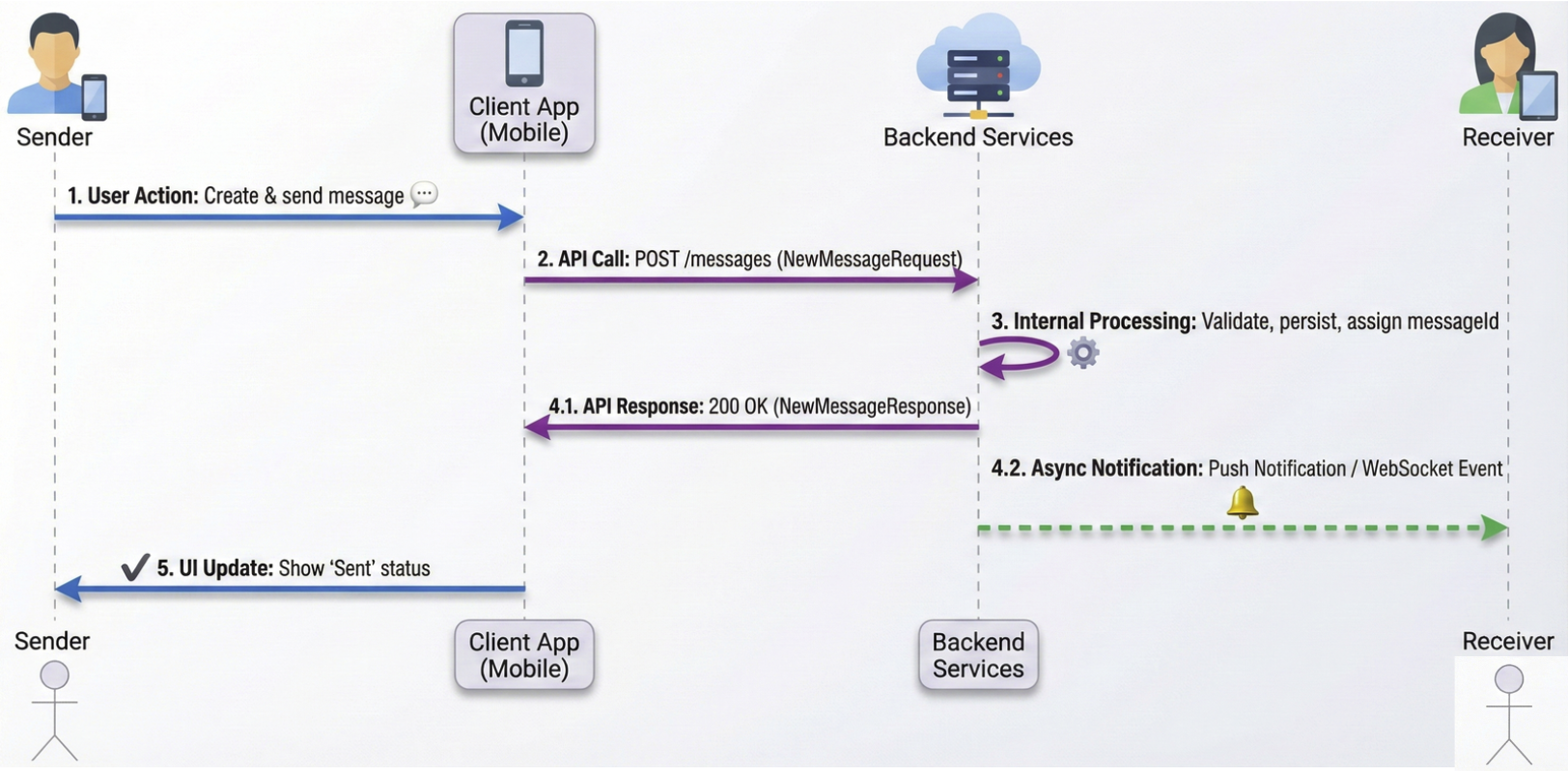
Simply follow this flow
1 Immediate Storage & Display - The Messages repository immediately creates and stores new messages, and the UI displays them on screen right away to provide instant feedback.
2 Remote Forwarding - Behind the scenes, the repository forwards this message to the Messages remote data source, which packages it as a NewMessageRequest and sends it to the backend via HTTP.
3 Server Processing - The backend processes this request, generating a unique messageId for the message.
4 Dual Notification - The backend then takes two parallel actions.
(4.1) It sends a 201 response back to the sender with a NewMessageResponse object.
(4.2) It notifies the recipient, either through a WebSocket if they are active, or a push notification if they are inactive.
5 Local Update - Once the sender's client receives the HTTP response, it updates the message in local storage with the new messageId. Lastly, the UI refreshes to show successful delivery.
Message ordering in chat applications is a complex problem with no single perfect solution. By understanding the trade-offs between different approaches, developers can choose the best strategy for their specific needs. The hybrid approach, combining client-side timestamps for pending messages and server-side IDs for confirmed messages, offers a robust and user-friendly solution that is widely adopted in the industry.